RP2040 Macro Controller
A Raspberry Pi Pico W control surface with nine buttons, three rotary encoders, a 128×64 OLED, USB HID, Philips Hue control, and direct Spotify playback data.
Overview
This project is a custom desktop control surface built around a Raspberry Pi Pico W / RP2040. It combines nine pushbuttons, three rotary encoders, a 128×64 SSD1306 OLED, USB HID controls, Wi-Fi networking, Philips Hue control, and Spotify playback information in one small embedded device.
The firmware is written in MicroPython and has been refactored into separate hardware, action, state, and network-service modules so new controls and display pages can be added without keeping all behavior in one large script.
Hardware
The current controller uses nine digital button inputs and three incremental rotary encoders. The OLED is connected over I²C on GP21/GP20 at address 0x3C. USB HID lets the board send keyboard and consumer-control events directly to the host computer, while the Pico W's Wi-Fi handles Hue and Spotify network features.
Button Mapping
| Button | GPIO | Action |
|---|---|---|
| 1 | GP4 | Previous track |
| 2 | GP3 | Play / pause |
| 3 | GP2 | Next track |
| 4 | GP9 | Win+X, then A shortcut sequence |
| 5 | GP8 | Show desktop |
| 6 | GP7 | Screenshot |
| 7 | GP12 | Switch OLED layer / display page |
| 8 | GP11 | Toggle configured Philips Hue light |
| 9 | GP10 | Send F13 and toggle displayed mute state |
Rotary Encoders
| Encoder | GPIO | Role |
|---|---|---|
| 1 | GP17 / GP16 | System-volume control and OLED value |
| 2 | GP18 / GP19 | Spotify-related control/display value |
| 3 | GP15 / GP14 | Discord-related control/display value |
The original display model used local percentage estimates, with one encoder step equal to 10 percentage points. Those local values were intentionally simple and did not require reading state back from Windows, Spotify, or Discord.
OLED Interface
The SSD1306 OLED gives the controller feedback that ordinary keyboard shortcuts do not provide. The base firmware uses multiple layers/pages so one small display can show several categories of information.
- Philips Hue light state
- Displayed mute state
- Main volume estimate
- Spotify encoder value
- Discord encoder value
The project has since expanded with a dedicated Spotify now-playing display that can show live track and artist information, progress, duration, and playback state.
USB HID
The Pico W acts as a USB HID device and can send both keyboard events and consumer media controls. That allows physical buttons to trigger host actions without installing a custom desktop driver. Input debouncing prevents a single physical press from being interpreted as multiple commands.
Philips Hue Integration
One of the networked features is direct control of a Philips Hue light. During
testing I found that the Hue bridge returned HTTP responses using
Connection: close without a Content-Length or
Transfer-Encoding header. On this setup, the normal
adafruit_requests path could read the response headers but returned
an empty body.
I changed the Hue service to use a raw socketpool TCP socket for
GET/PUT requests and read until the bridge closed the connection. Hue state is
synchronized every 30 seconds, while the dedicated Hue button updates the light
and OLED state immediately after a successful command.
Wi-Fi Behavior
Networking is initialized during startup and shared by the service layer. The firmware avoids repeatedly recreating the Wi-Fi/socket objects after a successful connection. If initial network setup fails completely, the Wi-Fi service retries every 15 seconds until the shared networking objects can be created.
Direct Spotify Now-Playing Service
A later revision moved beyond a locally estimated Spotify value and added direct
playback-state polling from the Pico W. The Spotify service uses an OAuth refresh
token to obtain short-lived access tokens and polls Spotify's
/v1/me/player/currently-playing endpoint.
Because the RP2040 has limited RAM, the service does not load Spotify's complete playback response into memory. It uses a streaming JSON parser and keeps only the fields needed by the OLED: playing/paused state, track title, artist, progress, duration, and playback type.
| Response / condition | Firmware behavior |
|---|---|
| 200 | Streams and applies current playback metadata. |
| 204 | Sets the shared state to “nothing playing.” |
| 401 | Refreshes the access token and retries once. |
| 429 | Reads Retry-After and delays the next poll. |
| Advertisement | Displays an advertisement state without assuming a normal track item. |
State & Display Integration
Network services do not draw directly to the OLED. Instead, they update shared application state, and the display layer renders that state. This reduces coupling between networking and UI code and makes it easier to add additional display pages.
The Spotify state includes whether playback is active, the track title, artist, progress, and duration. The service also distinguishes paused playback, no active item, and advertisement responses so the display has a meaningful state instead of assuming every successful request contains a song.
What I Learned
The macropad started as a simple HID controller and evolved into a small connected embedded system. The project gave me hands-on experience with digital inputs, rotary encoders, I²C displays, USB HID, state-driven UI design, Wi-Fi services, HTTP edge cases, OAuth token refresh, memory-constrained JSON parsing, and refactoring embedded firmware into maintainable modules.
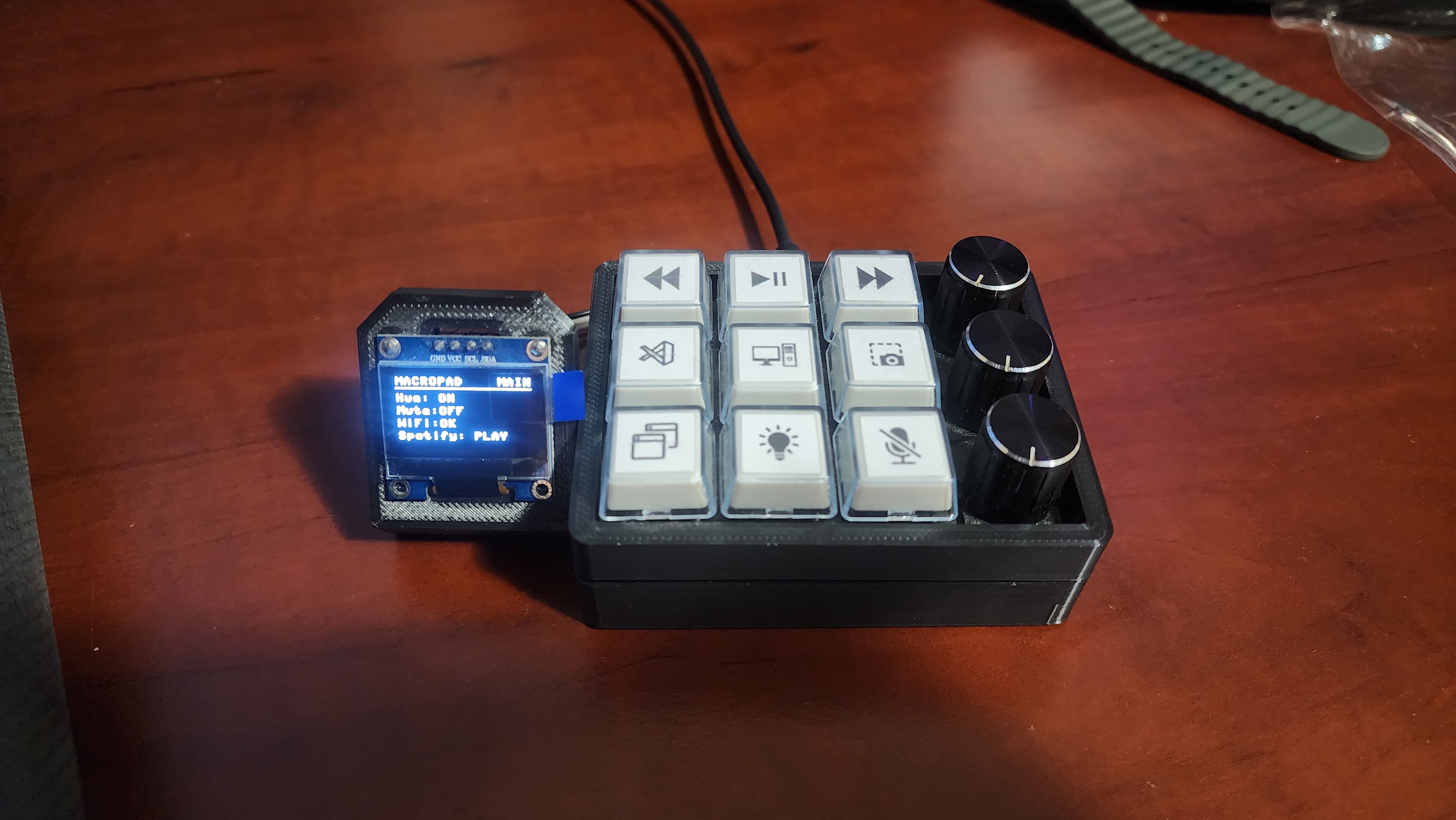
Completed desktop control surface featuring nine programmable keys, three rotary encoders, and a 128×64 OLED display. The controller combines USB HID media controls, application shortcuts, Philips Hue integration, and network-connected status information in a custom enclosure.
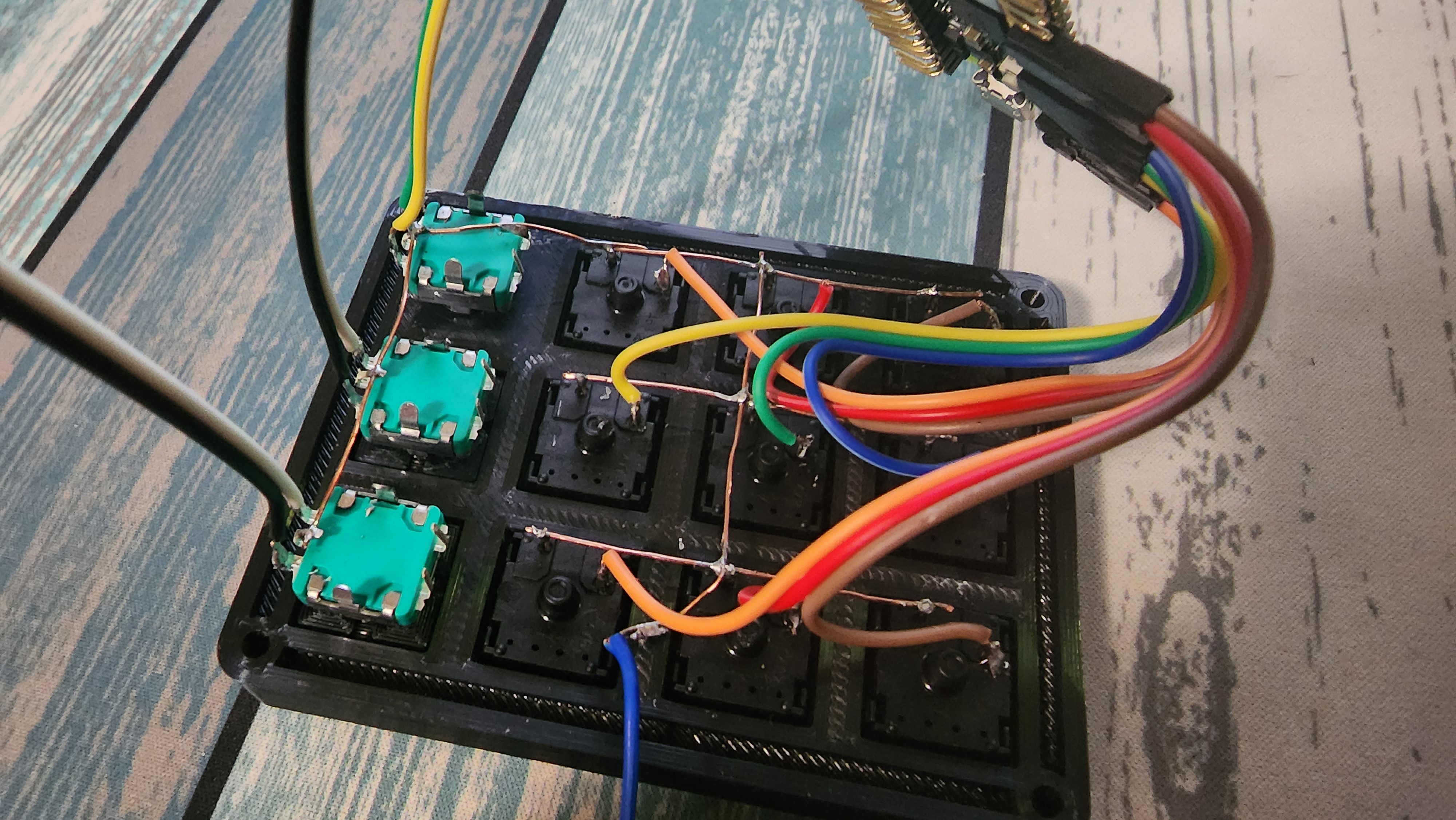
Internal view of the nine mechanical switches and three rotary encoders. The controls are read through the RP2040 GPIO interface with software debouncing and encoder processing handled by the firmware.
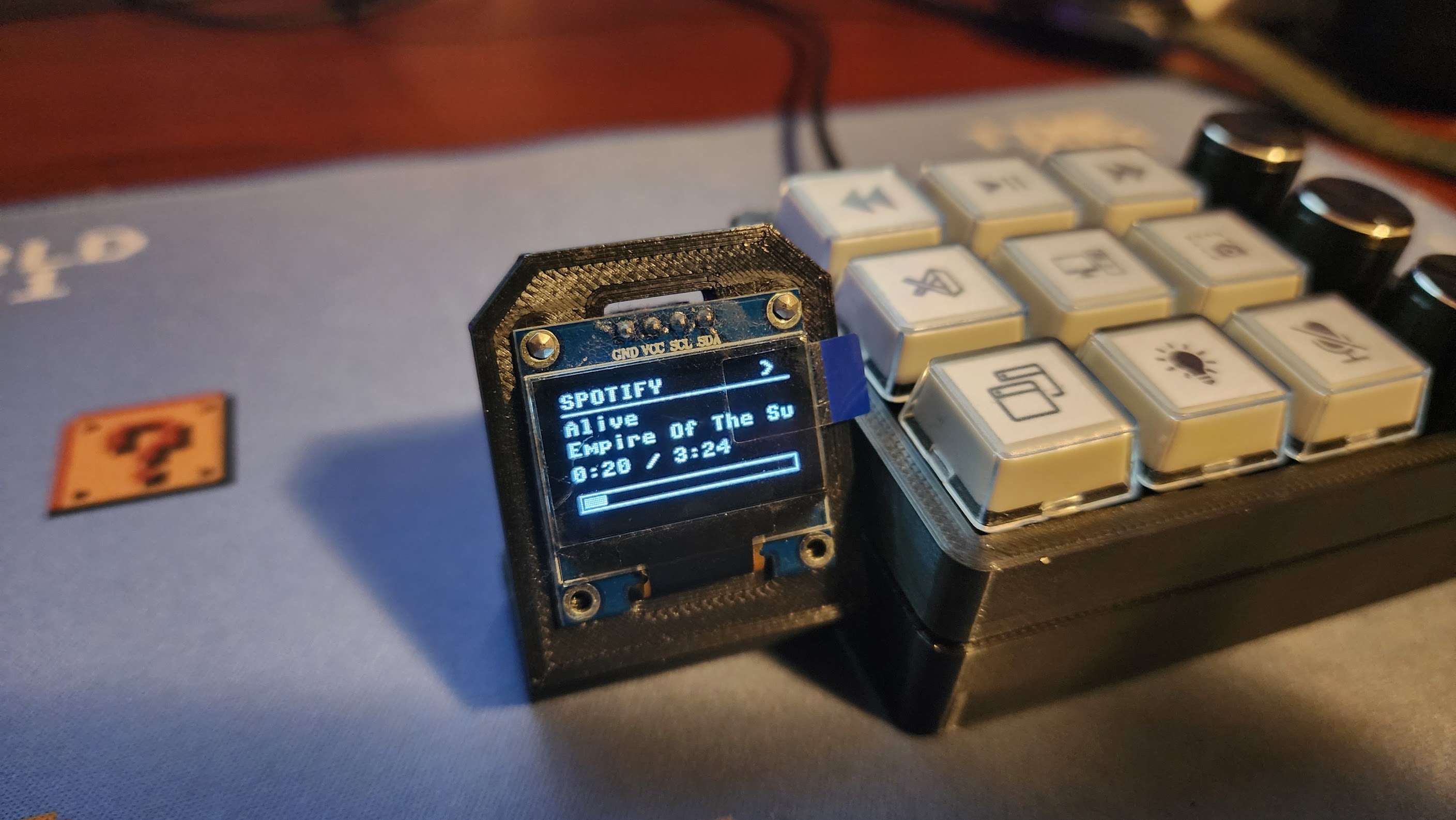
OLED interface displaying live Spotify playback information retrieved directly by the Pico W, including track title, artist, playback state, progress, and duration. The display also supports additional pages for device status and control modes.
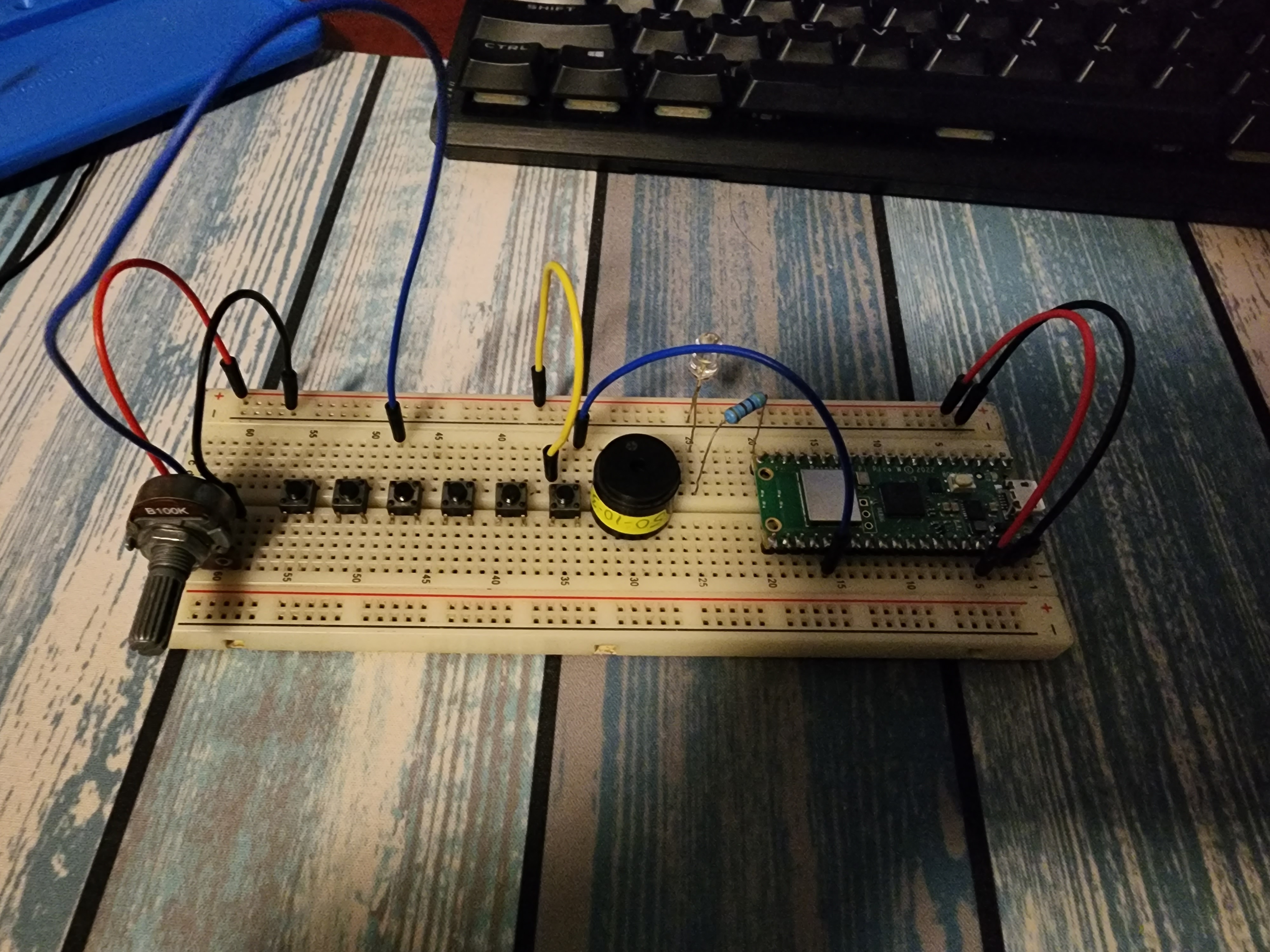
Development-stage assembly used to validate switch wiring, encoder behavior, GPIO assignments.